
To switch the network that obnizOS connects to over to Wi-Fi or Ethernet, you need to put it into setting mode. In setting mode, you can also make detailed configuration changes from JSON, such as the behavior of the LEDs and buttons.
Setting Mode
In normal LTE connection mode, the unit does not transition to setting mode automatically; it is designed so that the settings are not normally changed. Use setting mode in cases such as when LTE is unavailable and you want to use Wi-Fi.
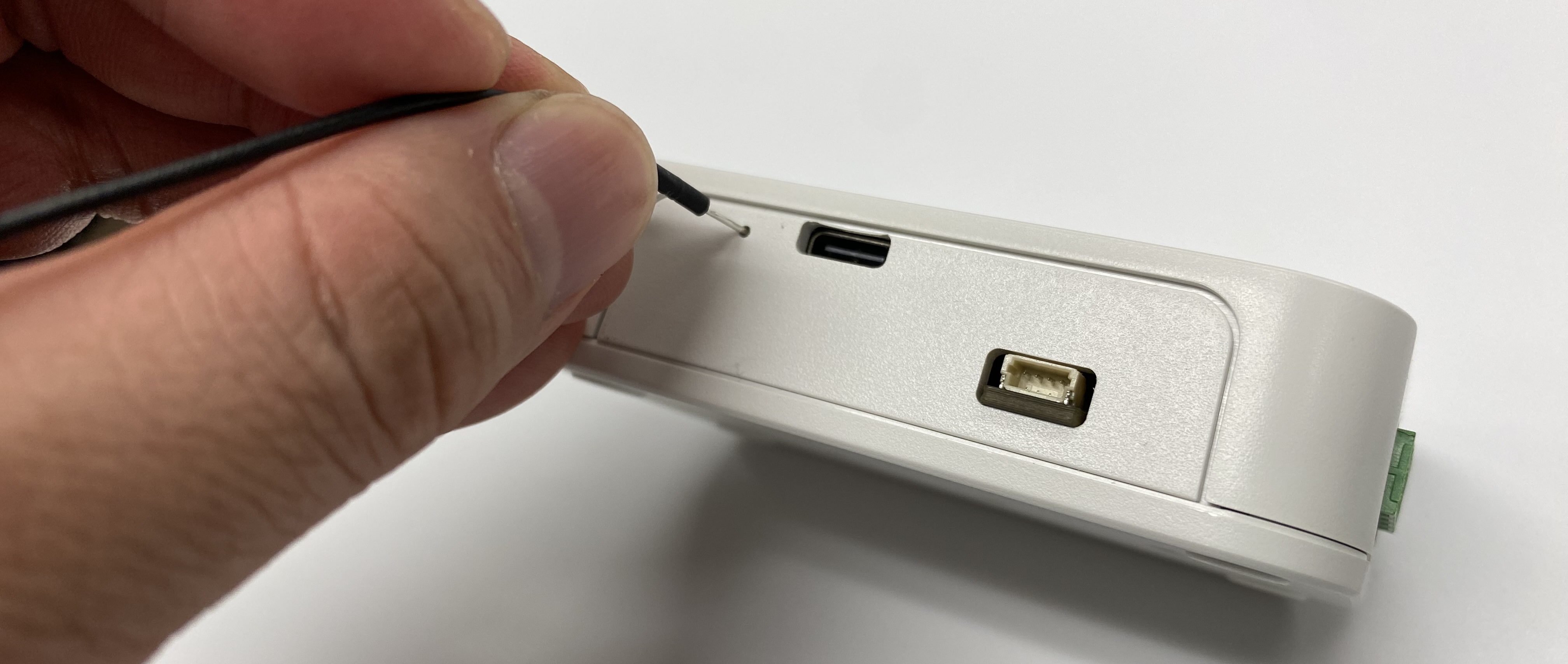
To enter the settings, you need to press and hold the setting button for 3 seconds or more. With the power on, prepare a thin pin such as a SIM pin and press and hold the recessed button. The button is small and difficult to press.
When the unit enters setting mode, the white LED on the unit begins to blink slowly. In addition, the unit broadcasts a Wi-Fi network for configuration with the SSID "obniz-xxxxxxxx" (x is the obnizID).
Configuration Methods
The configuration methods supported by the Intelligent Edge Kilo (Kilo) are as follows.
For each configuration method, refer to the obnizOS reference.