
🎯
Goal
Understand how to safely connect to devices such as PCs, PLCs, and sensors using the Ethernet terminal of Intelligent Edge Kilo.
Overview
Intelligent Edge Kilo (Kilo) is equipped with an Ethernet (RJ45) terminal.
This page focuses specifically on local connections to devices (PCs, PLCs, sensors, etc.).
Wiring and Connection
❗
You can connect sensors and communication cables even while Kilo is powered on.
However, contact with metal parts or incorrect connection of the power lines may damage the equipment.
Always check the voltage specifications of the device you are connecting, and work in a safe environment.
Connect an Ethernet cable to the RJ45 terminal on the surface of Kilo, and connect the other end to the target device (PC, PLC, sensor, etc.).
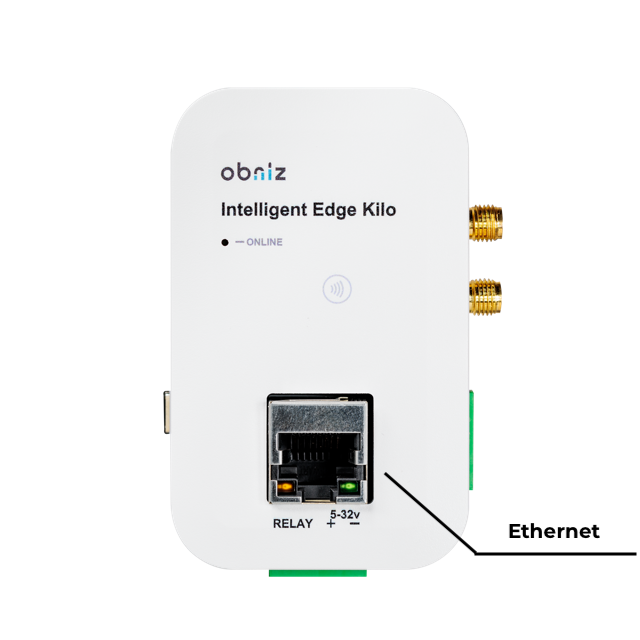
❗
There is no automatic cable-type detection function (straight/crossover). Choose the appropriate cable according to the target device.
- Straight: switching hubs, routers, etc.
- Crossover: direct connection to devices such as PCs and PLCs
The LEDs near the connector (ONLINE, etc.) light up independently of the software state.
Kilo does not support PoE. It cannot supply or receive power through the Ethernet cable.
Connecting to Local Devices (PC/PLC/Sensor, etc.)
- For the purpose of communicating with local devices, no special configuration on the obnizOS side is required.
⚠️
・In this mode, Ethernet is not used for WAN.
If you need an internet connection, use it together with LTE-M/NB-IoT.
・For internet connection (using it as a WAN), configuration (enabling) on the obnizOS side is required.
For the configuration steps, see “Connecting to the Internet via Ethernet (WAN configuration)”.
Operation and Control
| Timing | Behavior |
|---|---|
| Immediately after startup | The physical link is not yet established. The link is established according to the cable connection and the state of the other device (the LEDs light up independently of the software). |
| Local device mode | No additional configuration on the OS side is required. Communication is controlled from the application (cloud, plugin, etc.). |