
🎯
Goal
Understand the overview of the CANBus feature on Intelligent Edge Kilo and how to connect to it.
Overview
Intelligent Edge Kilo (Kilo) has a built-in CANBus transceiver.
CANBus is a differential signaling communication method that enables stable communication even in noisy mobility environments.
It is widely used in fields such as automotive, industrial equipment, and robotics.
Wiring and Connection
❗
You can connect sensors and communication cables even while Kilo is powered on.
However, contact with metal parts or incorrect connection of the power lines may damage the equipment.
Always check the voltage specifications of the device you are connecting, and work in a safe environment.
⚫︎ CAN Terminals
Connect H (high-potential side) and L (low-potential side) to the CAN terminals on the side of Kilo.
The side panel is labeled "H" and "L".
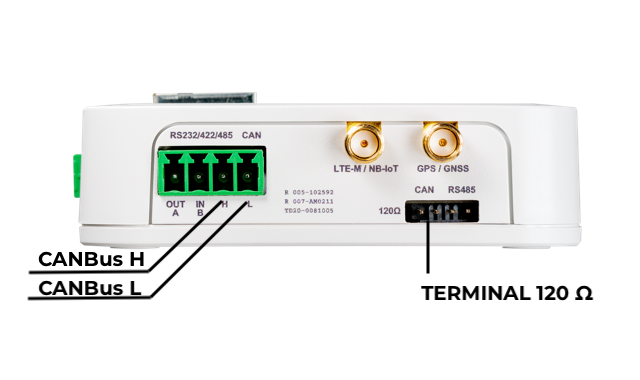
❗
There is no dedicated GND terminal for CAN communication.
If you need to match GND levels, connect one of the following to the GND of the other device.
- The "−" terminal of Kilo's power section
- The GND of the Qwiic terminal
Can Be Used Together with RS-232/422/485
On Kilo, the CANBus and RS-232/422/485 terminals are physically located side by side, but CANBus operates independently.
As a result, simultaneous use such as "RS-232 + CANBus" is also possible.
Termination Resistor
- Kilo has a built-in 120Ω termination resistor.
- It is enabled by shorting CAN with the "120Ω" pin header on the front.
- If Kilo is located at either end of the CAN bus, enable the termination resistor.
Operation and Control
⚫︎ State at Startup
| Timing | State |
|---|---|
| Immediately after power-on | Hi-Z (high impedance). No signal is output immediately after startup. However, after a restart, the previous state is retained. |
| CANBus enabled by software | Communication starts and the device becomes ready to send and receive. |
Communication Modes
The CANBus communication speed conforms to the product specifications.
You can select the following modes via software settings.
| Mode | Description |
|---|---|
| normal | Normal operation. Requires an ACK after transmission. |
| noack | No error occurs even if there is no ACK after transmission. |
| listen | A mode that does not transmit and only receives (suitable for bus monitoring). |
⚫︎ ID and Filter Settings
- You can choose the ID bit length from two types: "standard" and "extended".
- Packet filtering using IDs and masks is possible (without a filter, all packets are received).
- By extending the device-side filter through software, you can also reduce traffic.