🎯
Goal
Understand the overview of RS-485 and RS-422 on Intelligent Edge Kilo and how to connect to them.
Overview
Intelligent Edge Kilo (Kilo) has a built-in RS-485 (RS-422 compatible) transceiver.
Communication method: differential signaling (a method that reads the potential difference between two lines; it is noise-resistant and suitable for long-distance communication).
⚫︎ What Is RS-485
A half-duplex differential communication method that connects multiple devices using two signal lines (A/B).
It is widely used for communication between industrial devices, such as Modbus RTU (the protocol is the application layer; RS-485 is the physical layer).
⚫︎ What Is RS-422
A full-duplex differential communication method that handles transmission (TX±) and reception (RX±) on separate lines.
On Kilo, only either transmission or reception can be used.
It is widely used for communication between industrial devices, such as Modbus RTU (the protocol is the application layer; RS-422 is the physical layer).
⚫︎ Shared RS-232/422/485 Terminal
Kilo uses a shared RS-232/422/485 terminal.
By wiring a D-sub 9-pin (DB9/DSUB9) connector, you can connect directly to external devices.
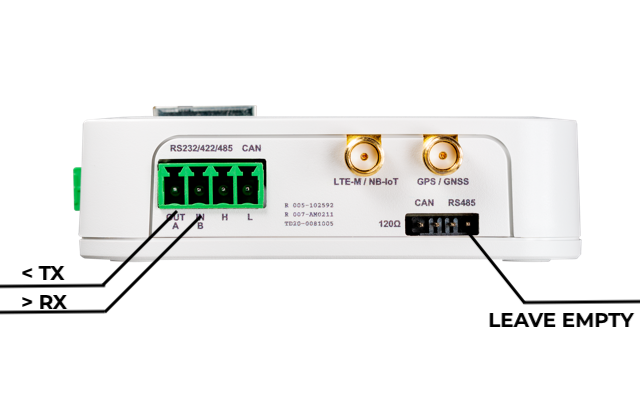
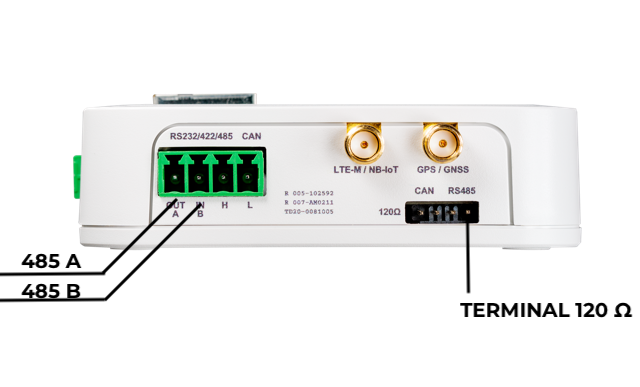
There are 4 terminals: OUT A, IN B, H, and L.
Wiring and Connection
❗
You can connect sensors and communication cables even while Kilo is powered on.
However, contact with metal parts or incorrect connection of the power lines may damage the equipment.
Always check the voltage specifications of the device you are connecting, and work in a safe environment.
⚫︎ RS-485 (2-wire: A/B)
- A (485 A)
- B (485 B)
As printed on the top panel, A and B are fixed.
It is widely used with industrial protocols such as Modbus RTU (protocol = application layer, RS-485 = physical layer).
⚫︎ RS-422 (4-wire: TX±/RX±)
This uses the 4 terminals OUT A (485A), IN B (485B), H, and L.
For RS-422 communication, Kilo can use either transmission or reception, one side only.
Wiring Assignment
- TX pair: OUT A (TX−)/IN B (TX+)
- RX pair: H (RX+)/L (RX−)
It is widely used with industrial protocols such as Modbus RTU (protocol = application layer, RS-422 = physical layer).
❗
There is no dedicated GND terminal for RS-485/RS-422.
If you need to match GND levels, connect one of the following to the GND of the other device.
- The "−" terminal of Kilo's power section
- The GND of the Qwiic terminal
Termination Resistor
⚫︎ RS-485 Termination Resistor
- Kilo has a built-in 120Ω termination resistor.
- It is enabled by shorting RS485 with the "120Ω" pin header on the front.
- In a bus configuration, terminate both ends with 120Ω (enable it if Kilo is at an end).
⚫︎ RS-422 Termination Resistor
- A termination of 100–120Ω on the receiving side is common.
- Kilo's built-in terminator is for RS-485/RS422.
⚠️
- For RS-232, disable (remove) the termination resistor (because RS-232 communicates over a single signal line, it differs from differential communication (RS-485/RS-422)).
Operation and Control
⚫︎ State at Startup
| Timing | State |
|---|---|
| Immediately after power-on | Hi-Z (high impedance). No output immediately after startup. However, after a restart, the previous state is retained |
| RS-485/RS-422 enabled by software | Communication becomes possible, and input and output are enabled. |