
Overview
Intelligent Edge Kilo (Kilo) has a built-in solid state relay (SSR).
It can perform contact control of external devices and is used as a Form A (normally open) contact.
Wiring and Connection
❗
You can connect sensors and communication cables even while Kilo is powered on.
However, contact with metal parts or incorrect connection of the power lines may damage the equipment.
Always check the voltage specifications of the device you are connecting, and work in a safe environment.
Connect the device whose contact you want to control to the "RELAY" terminal, located in the same block as the power connector on the side of Kilo.
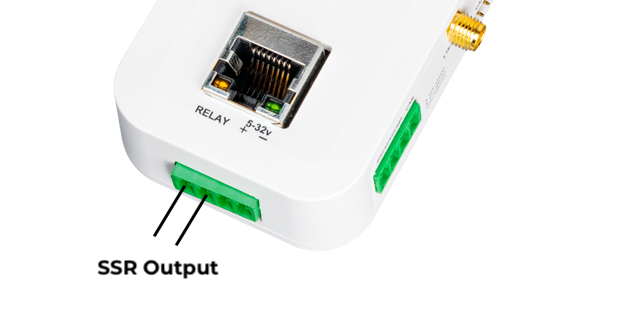
The relay terminal is an independent, isolated terminal that is not connected to other terminals or the power lines.
It can be used to switch a current path.
⚠️
- The rated voltage is 60V or less. It supports low-voltage contact control such as 24V PLCs.
- Be sure to check “Relay Specifications” on the specifications page, and pay attention to the allowable current and resistance values.
Operation and Control
⚫︎ State at Startup
| Timing | Contact State |
|---|---|
| Immediately after power-on | OFF (open). No current flows and the contact remains open. However, after a restart, the previous state is carried over. |
| Relay control enabled by software | If the setting is ON, the contact closes and current flows. |
⚫︎ Retention of ON/OFF State
Once set, the relay state is retained until it is changed by software or the power is completely cut off.
As a result, the relay remains ON even in situations such as the following.
- The internet connection is disconnected
- The software or obnizOS restarts
- The device enters sleep mode
If you want the relay to turn OFF automatically under these conditions, you can handle this with device-side control via a plugin.