
OS7 or later
"Self-hosting" is a method that allows you to use obniz devices via software in environments where internet access is unavailable.
This feature is ideal for the following scenarios:
- When you need to operate within a closed network or a specific local site network.
- When you cannot use cloud services and want to operate using only your own server, without depending on obnizCloud.
Important Notes
By using self-hosting, your devices will operate outside of the obniz cloud service agreement. You will be responsible for managing connections and device maintenance yourself.
Please be aware that the following items will be excluded from our service coverage and will not be supported by obniz:
- Device connection management and troubleshooting.
- Protection against security attacks on the device.
- Prevention of unintended software flashing to the device.
- Device OS updates.
System Architecture
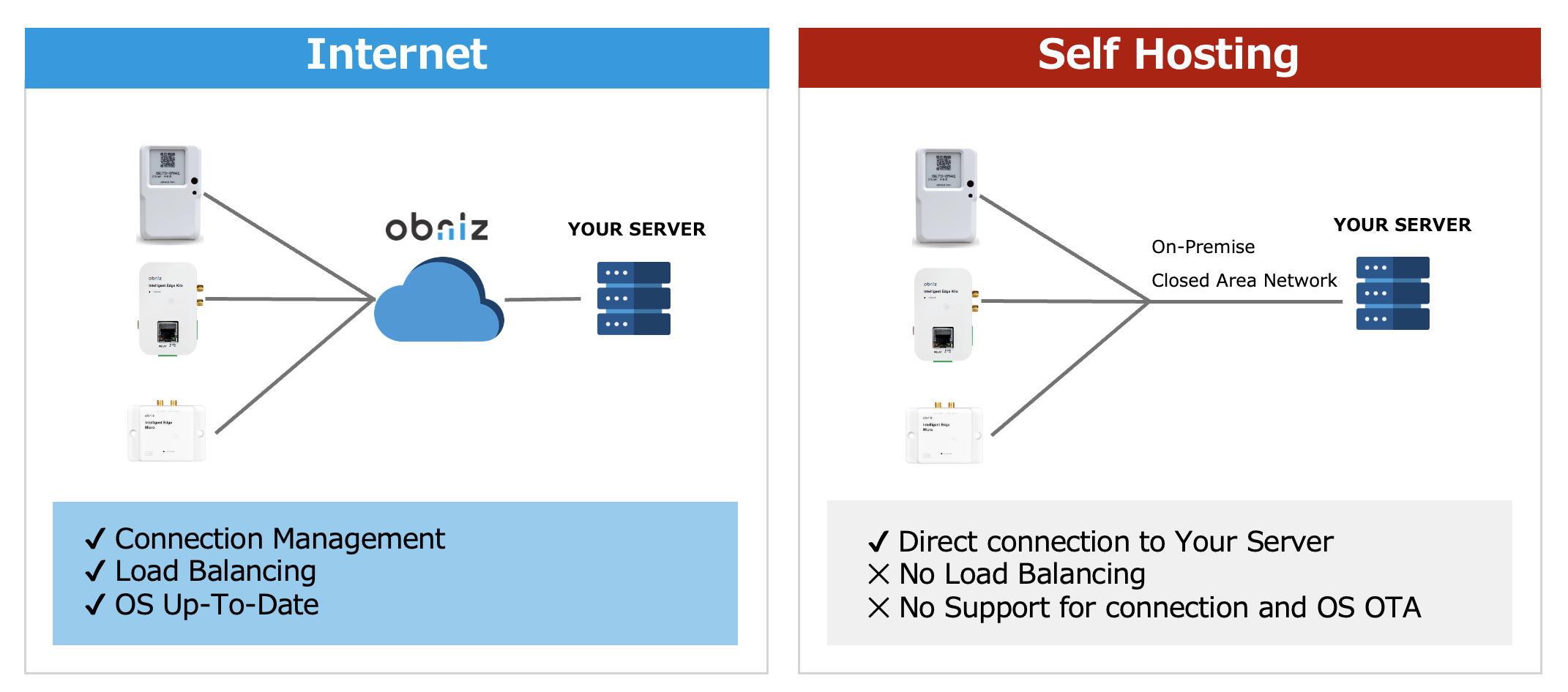
Normally, obnizOS establishes a continuous, bidirectional TLS connection with obnizCloud. This allows you to control the device by sending instructions to obnizCloud via the SDK.
In a self-hosting setup, you change the device's connection destination from obnizCloud to your own server. By specifying a server you have prepared, you can establish a direct connection with the SDK without using obnizCloud.
Server Setup
When developing with obniz.js or the AppSDK in a standard cloud environment, the program accesses the obnizCloud API. In a self-hosting environment, the program does not access external services; instead, it waits for incoming connections from the devices.
obniz-dock acts as the bridge that waits for device connections and establishes a link between the device and the control program using obniz.js.
For detailed instructions, please refer to the GitHub page linked above.
By hosting a server running obniz-dock on a local on-premise server or a private cloud and ensuring its continuous operation, you can maintain control over your devices.
Connection and Device Configuration
For devices running OS7 or later, you can change the connection destination using a Setting JSON. This can be configured via the serial console or a web browser.
Specify the server where the aforementioned obniz-dock is running as the destination.
The connection uses the WebSocket protocol. Please note that TLS is not supported in self-hosting, and communications will be sent in plaintext.
Specifying by IP Address
If the server is waiting for connections at a specific IP address, use the format below. If no port is specified, it defaults to port 80.
{
    "ws_server": "ws://192.168.0.2"
}
{
    "ws_server": "ws://192.168.0.2:8080"
}
Specifying by Domain
To specify the server using a domain name, use the following format. If no port is specified, it defaults to port 80.
{
    "ws_server": "ws://mydomain.com"
}
Security
Self-hosting involves different security considerations compared to a standard cloud connection. Please review the table below:
| Feature | obnizCloud | Self-Hosting |
|---|---|---|
| Vulnerability Patches | OS can be updated as new versions are released. | OS cannot be updated directly. You must connect to the cloud temporarily to update. |
| Encryption | Encrypted via TLS 1.2. | Plaintext communication. |
| Server Authentication | Authenticated via certificates managed by obniz. | Not performed. |
| Device Authentication | Authenticated via certificates managed by obniz. | Not performed. |
To enhance security in a self-hosting environment, we recommend the following measures:
- Restrict connecting devices (e.g., by limiting MAC addresses allowed on the network).
- Use isolated networks, such as a closed VPN or a private LAN.
Customization
For enterprise customers with specific requirements, obniz offers customization of hardware and OS. Please contact us if you require:
- Self-hosting server connections using TLS and certificates.
- Additional device authentication layers.