
OS7 or later
The Lua Plugin is a feature that allows you to embed software directly into the device to control offline behavior and compress data communications.
Device-Side Software
By default, obniz devices only contain the OS and are operated remotely from a server via the SDK and API.
By using Lua, you can write and execute programs directly on the device. This is ideal when you need to define device behavior during network outages or when you want to compress communication data.
What you can do with the Lua Plugin:
- Start data logging immediately upon boot.
- Perform predefined operations regardless of whether the device is online or offline.
- Filter or compress specific data before sending it to the server.
- Receive specific data or perform contact/IO operations at regular intervals.
- Monitor status while offline, remain in sleep mode, and only connect to the internet when data needs to be sent.
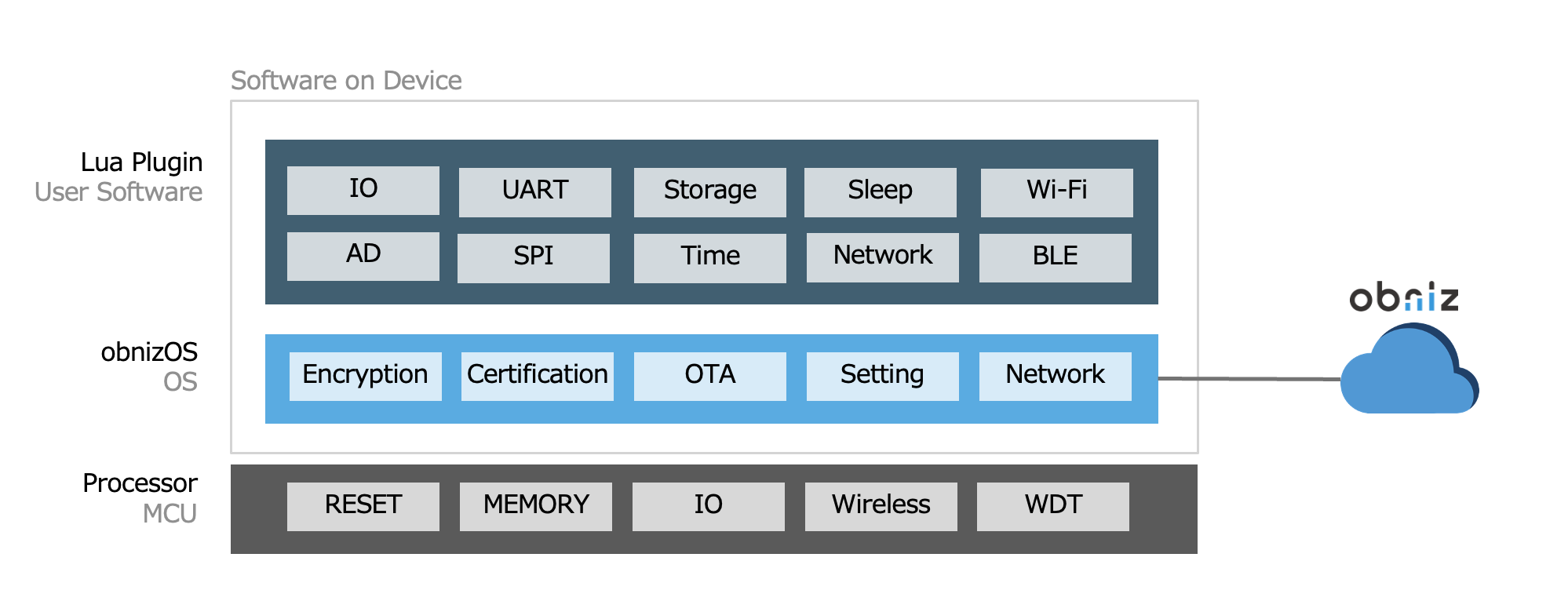
Lua Operation
Lua scripts can either be saved to the device for permanent execution or executed on-the-fly via the cloud.
Scripts saved on the device are automatically loaded and executed upon startup.
(Note: Lua scripts will not be executed if the device starts in Safe Mode.)
Saving Lua Scripts to the Device
You can save Lua scripts to the device using one of the following methods:
- Via Serial Console
- Via obniz.js
The following example shows how to save a script using obniz.js. Once executed, the device will output Hello World to the serial console every time it boots.
  obniz.storage!.savePluginLua(`os.log("Hello World");`);
  obniz.plugin!.reloadLua();
On-the-Fly Lua Execution
You can execute Lua scripts via the SDK without saving them to the device's permanent storage.
  obniz.plugin!.execLua(`
      x=1;
      x=x+2;
      os.log(x.."\\n")
  `); // will print "3" on obnizOS console (requires console enabled)

  obniz.plugin!.execLua(`os.log(os.getTick().."\\n")`);
  obniz.plugin!.execLua(`os.log(os.getTick().."\\n")`);
By using this feature, you can update necessary functions and variables in real-time without restarting the device. This allows for rapid optimization of device behavior and maximum reduction of communication volume without any downtime.
Example: Changing communication frequency from the cloud based on values
  if (temperature > 26) {
    obniz.plugin!.execLua(`
      interval = 1;
    `);
  } else {
    obniz.plugin!.execLua(`
      interval = 60;
    `);
  }
Example: Switching the type of data sent based on the mode
  if (mode == 'temperature') {
    obniz.plugin!.execLua(`
      function filter(data)
        if data.temperature == nil then
          return nil
        end
        return data
      end
    `);
  } else {
    obniz.plugin!.execLua(`
      function filter(data)
        return data
      end
    `);
  }
Lua Execution Environment
Lua runs on the same CPU that runs obnizOS. Please note the following specifications and constraints:
| Item | Description |
|---|---|
| Language | Lua 5.4.7 (Support varies depending on the obnizOS version) |
| Numeric Precision (int/double) | 32-bit |
| Flash Storage Capacity | Max 500 KB (May decrease depending on the device and other stored data) |
| Memory (RAM) | Max 200 KB (May decrease depending on the device and OS usage) |
obnizOS constantly monitors Lua execution. If the OS detects an anomaly, it will automatically stop the script or restart the device in Safe Mode. This safeguards the device from being bricked by faulty scripts and ensures that cloud connectivity is maintained whenever possible.
Available Lua Functions
For more detailed information on programming with Lua, please refer to the obniz.js Guide.