
Plug-in class Reference
Lua examples on GitHub
Available for OS7 and later
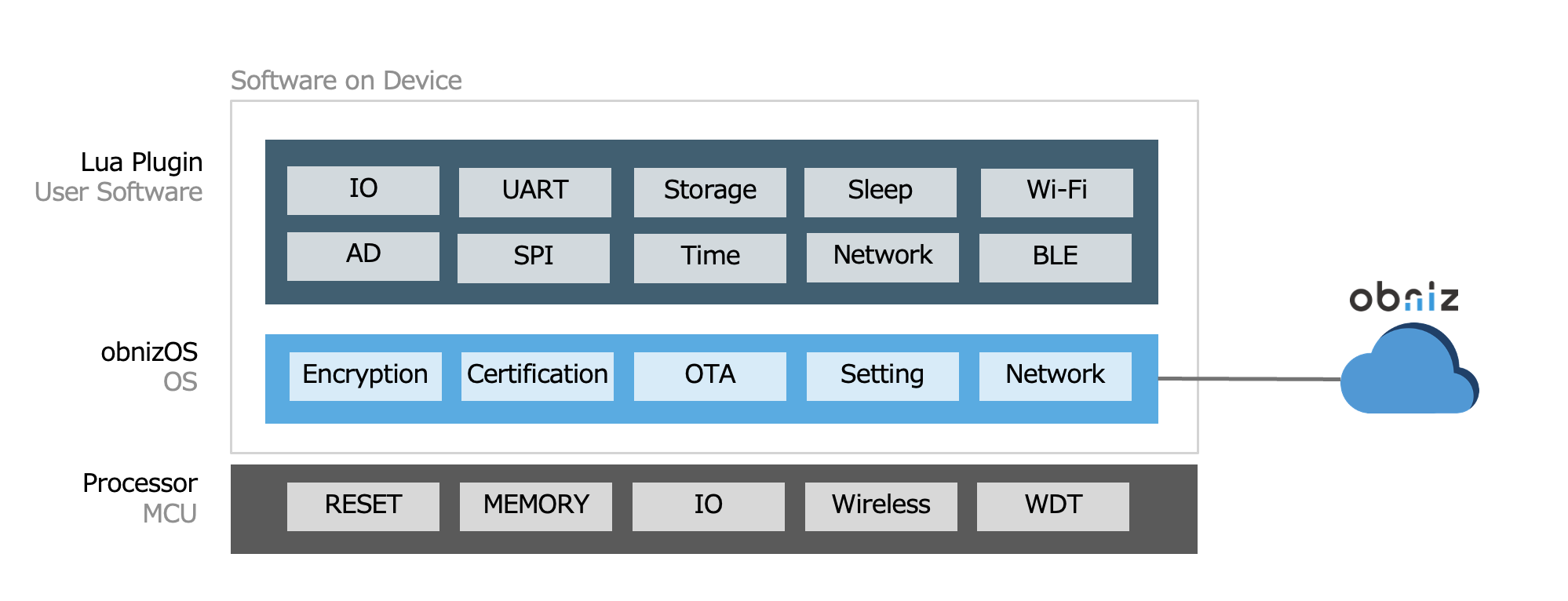
The Plugin is a feature that allows you to expand the functionality of your device by adding code.
It can be executed on the device as a small app controlled by the OS, while maintaining the standard operations of obnizOS.
This enables advanced optimization directly on the obniz device, such as offline operations and the compression of communication data.
What You Can Do with the Lua Plugin
- Start recording data from the moment the device boots up.
- Perform specific actions regardless of whether the device is online or offline.
- Send only specific data to the server or perform data compression.
- Receive specific data or operate I/O pins at regular intervals.
- Monitor device status offline, enter sleep mode, and connect to the internet only when data needs to be sent.
Writing and Execution
Lua scripts will start immidiately on startup by OS regardless network connection status.
To write Lua scripts from obniz.js (instead of using the serial console), you can send and save a string as shown below.
Use obniz.storage.savePluginLua() to overwrite the internal flash memory. Note that this method only performs the overwrite; the changes will take effect after a reboot. To apply changes immediately, call obniz.plugin.reloadLua().
// Javascript Example

obniz.storage.savePluginLua(`
 os.log("Hello World")
`);
obniz.plugin.reloadLua();
Preventing Redundant Writes
Rewriting the plugin on every connection will negatively impact the lifespan of the internal flash memory. Therefore, it is important to implement a check to skip writing if the expected Lua script is already present.
obnizOS transmits the name of the Lua script loaded at startup. You can prevent redundant writes by comparing this name. The property obniz.plugin_name contains the name of the plugin used during startup. You can specify this name within the Lua script as the return value of the plugin_name() function.
// Javascript Example

  if (obniz.plugin_name !== 'my_plugin') {
    console.log("Must Load Plugin");
    obniz.storage.savePluginLua(`
function plugin_name()
  return "my_plugin"  -- max 30 chars
end
`);
    obniz.plugin.reloadLua();
    obniz.reboot(); // Not necessary in every case.
  } else {
    console.log("No Need to Load Plugin");
  }
On-the-fly Execution
Lua scripts can be executed at any time via the SDK without being saved to the device's permanent storage.
// Javascript Example
  obniz.plugin.execLua(`
      x=1;
      x=x+2;
      os.log(x.."\\n")
  `); // will print "3" on the obnizOS console (requires console to be enabled)

  obniz.plugin.execLua(`os.log(os.getTick().."\\n")`);
  obniz.plugin.execLua(`os.log(os.getTick().."\\n")`);
By using this feature, you can update necessary functions and variables on demand without rebooting the device.
This enables high-speed optimization of device behavior and maximum compression of communication traffic without incurring any downtime.
Example: Changing communication frequency from the cloud based on values
// Javascript Example
  if (temperature > 26) {
    obniz.plugin.execLua(`
      interval = 1;
    `);
  } else {
    obniz.plugin.execLua(`
      interval = 60;
    `);
  }
Example: Switching the type of transmitted data based on modes
// Javascript Example
  if (mode == 'temperature') {
    obniz.plugin.execLua(`
      function filter(data)
        if data.temperature == nil then
          return nil
        end
        return data
      end
    `);
  } else {
    obniz.plugin.execLua(`
      function filter(data)
        return data
      end
    `);
  }
obniz.plugin.onError
Available for OS7.1.0 and later
This event handler receives errors raised by the Lua plugin on the device. It is called whenever a script fails, including scripts started with execLua() and the plugin loaded at startup.
// Javascript Example
obniz.plugin.onError = (error) => {
  console.log(`error occurred: ${error.message}`);
};

// A failing script triggers onError
obniz.plugin.execLua(`MUST FAILED`);
The error argument is an object with a message property describing the Lua error.
on_low_memory(largestFreeBlock)
Available for OS7.1.0 and later
When free memory on the device runs low, the OS calls on_low_memory() before an allocation can fail. The argument is the largest contiguous free block, in bytes, which represents the real headroom for the next allocation.
Define this handler to release tables, buffers, or other resources you no longer need, so the plugin can recover instead of crashing.
function on_low_memory(largestFreeBlock)
  os.log("low memory: " .. tostring(largestFreeBlock));

  -- Release what you can spare
  cache = nil;
end
The OS calls this handler in two cases: proactively, when a garbage collection cannot restore enough memory, and as a last resort, when an allocation has already failed. To avoid recursion, the handler is not called again while it is already running.
Total of Lua functions
-- System Event Handler
function on_event(event)
  if event == "power_on" then
  elseif event == "setting_mode" then
  elseif event == "connecting_to_network" then
  elseif event == "connecting_to_cloud" then
  elseif event == "online" then
  end
end

-- func(int), module(int), data(string(uint8 array))
function on_upstream(func, module, data)
  if necessary then
    return 1;
  elseif rightnow then
    return 2;
  elseif mustDrop then
    cloud.upstreamEnqueue(1, 2, str); -- change to differenct command
    cloud.upstreamFlush(); -- optional
    return 0;
  end
end

-- received from obnis.js
function on_command(command)
  cloud.pluginSend("123");
end

-- called while online every around 1msec
function on_online_loop()
  -- os.log(\"online_loop\");
end

-- called while offline every around 1msec
-- You should care about communication because this function will be called
-- different thread.
function on_offline_loop()
  -- os.log(\"offline_loop\");
end

function on_self_check()
  os.log(" - self check ok");
end

-- called when free memory runs low (OS7.1.0+).
-- The argument is the largest contiguous free block in bytes.
-- Release resources here to avoid an out-of-memory crash.
function on_low_memory(largestFreeBlock)
  os.log("low memory: " .. tostring(largestFreeBlock));
end

function plugin_name()  -- will be get by obniz.plugin_name
  return "my_plugin"
end

-- Available Functions

-- OS
os.getTick(); -- system tick in msec
os.getUnixTime(); -- get seconds from 1970/1/1. you must adjust time by calling pingWait();
os.log("hello world");
os.wait(1000); -- 1,000msec wait
os.reboot();
os.resetOnDisconnect(false); -- It will never reset after disconnection. And queued data never lost when offline.
os.sleep(5 * 1000, 0); -- deep sleep + external module sleep.
os.sleep(5 * 1000, 1); -- deep sleep + without external module sleep.
os.sleep(5 * 1000, 2); -- light sleep + external module sleep.
os.sleep(5 * 1000, 3); -- light sleep + without external module
os.getVersion();
os.getHW();

-- storage file
storage.fileOpen("text.txt")
storage.fileWrite("ABC");
storage.fileAppend("abcdefg");
length = storage.fileGetSize();
data = storage.fileRead(0, length);
storage.fileClose();

-- storage kvs
error = storage.kvsSave({ name = "Yuki", attr = { engineer = true } })
data = storage.kvsLoad();

-- Cloud
cloud.connect();
cloud.disconnect();
cloud.upstreamEnqueue(0, 1, data) -- module func data
cloud.pluginSend(data);
cloud.pluginSendFrameStart(frame_id, length); -- framing
cloud.pluginSendFrameEnd(); -- framing
cloud.enqueueTimestampByTick(os.getTick()-1000); -- it will enqueue unix timestamp

-- cloud transaction (OS7.1.0+, must run inside a coroutine / callWait)
local success, result = cloud.transactionWait("ping", 5000); -- data, [callback], [timeout_ms]

-- io
io.retain(1, true);
io.output(1, true);
local val = io.input(1);
io.drive(1, "5v"); -- OS7.1.0+ : "push-pull3v"(default) / "5v" / "open-drain"
io.pull(1, "3v");  -- OS7.1.0+ : "float"(default) / "5v" / "3v" / "0v"

-- ad
local val = ad.get(1); -- 0.0v~3.3v

-- pwm (OS7.1.0+)
pwm.start(1);        -- start PWM on a logical obniz IO
pwm.freq(1, 1000);   -- frequency in Hz
pwm.duty(1, 50);     -- duty cycle 0-100%
pwm.stop(1);         -- stop and release the IO

-- uart
uart.start(1, 2, 9600)  -- tx:io1 rx:io2 baud:9600
uart.send("hello");
local data = uart.recv() -- uart.recv(1) limit to 1byte max
if #data > 1 then
  os.log(data); -- received
end
local used = uart.isUsed(); -- OS7.1.0+ : true once uart.start() succeeded

-- spi
local err = spi.start(20, 21, 19, 8, 100 * 1000); -- MOSI, MISO, CLK, CS(could be null for non shared SPI), baudrate
if err > 0 then
  os.log("SPI Error: " .. err);
  return
end
let result = spi.write(string.char(0x40, 0x00, 0xC0)); -- result must be 3bytes if success.
local used = spi.isUsed(); -- OS7.1.0+ : true once spi.start() succeeded

-- display (OS7.1.0+, no-op on products without a display)
display.print("Hello"); -- append a string at the cursor
display.clear();        -- clear the screen
display.raw({0x00, 0xFF}); -- draw a raw vertical-byte framebuffer

-- lte (OS7.1.0+, cellular products)
local resp, status = lte.at("AT+CSQ", 10000); -- command, [timeout_ms]; status 0=OK 1=ERROR 2=TIMEOUT 3=FATAL

-- net (talk to your own server, bypassing obniz Cloud; blocks until done. plain http only, no TLS.
--      use one socket at a time. http/tcp: wifi/lte/ethernet, udp: wifi/ethernet only (no LTE))
local status, body, headers = net.http.get("http://example.com");
local status, body, headers = net.http.post(url, body, "application/json");
local status, body, headers = net.http.request({ url = url, method = "GET", headers = {}, body = "", timeout = 30000 });
local id = net.tcp.connect("example.com", 80); -- host, port
local written = net.tcp.write(id, "data");
local data = net.tcp.read(id, 1024); -- "" = no data yet, nil = closed/error
net.tcp.close(id);
local uid = net.udp.open(0); -- [localPort]
local written = net.udp.sendTo(uid, "192.168.0.2", 5000, "data");
local data, ip, port = net.udp.receive(uid, 1024); -- nil = nothing waiting
net.udp.close(uid);

-- wifi
wifi.on();
wifi.off();
wifi.sniffStart(callback);
wifi.sniffSetChannel(2);
wifi.sniffStop();

-- ble
ble.on();
ble.off();
ble.scanStart(onFind, { -- default option values
  active=true,
  interval=16,
  window=16,
  phy1m=true,
  phyCoded=true,
  duplicate=true
});